
Scale success with complete control.
Control exactly what agents can do across reps, teams, and customers, track progress on every task, and decide when people need to step in.

A 2-page proposal taking Crestline from 24 seats to 34 for $46,000. Seats have been at 23 of 24 for three weeks, and finance started using a module they never bought. It’s ready for Emma to send.
- Seats have been at 23 of 24 since August 19.
- Four people in finance started using it on August 28.
See what agents are doing for every rep.
Review each rep’s assignments and completed work alongside the customer context—all in one workspace.
Read the briefs and reports prepared for your accounts, with the customer context you need to follow up.
See which accounts assignments cover, check recent runs, and review what agents have produced for each rep.
Pick up a colleague’s accounts with access to previous agent work and account context.


Know what needs your attention first.
Customer alerts and tasks needing human input appear in one prioritized view, with context to help you decide what to do next.
Customer alerts
See accounts that meet conditions you asked Trig to flag, with supporting context and a possible next step. For example, declining usage may call for a conversation with the customer.
Blocked work
See which task needs human input, the account it affects, and the step needed to unblock it. For example, map a new CRM field so updates can go through.


Put agents to work on what each account needs.
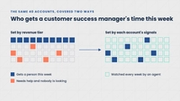
Choose the accounts, recipients, and timing for each assignment, tailoring the work by segment, account owner, or customer need.
Select accounts using attributes or lists. Set different tasks and timing for enterprise reviews, mid-market renewals, or scaled onboarding.
Prepare meeting briefs for a rep’s accounts and choose that rep as the recipient.
Use a Signal, such as slow onboarding, to select accounts for a progress review.

“Our drivers are everything, and Trig helped us to provide them with the most rewarding jobs. This is an opportunity that we have tried to solve before, but Trig made it so simple. It’s an amazing product.”
Review what agents did and decide what they do next.
Track each assignment’s progress against its objectives and adjust conditions as customer needs change.
Check each run’s start and finish times, accounts, status, and completed work. If a run is waiting on a person, see why.
Follow a brief, report, or update back to its run and assignment.
See progress against the assignment’s objectives using the latest account data.
See what has changed across the selected accounts since the assignment began.
Edit instructions, account selection, recipients, or timing. Pause an assignment when its task is no longer needed.
 The team · revenue pack in Slack
Frequently asked questions.
What is the Control Panel?
The Control Panel is where your team directs and checks agent work. It shows each rep’s assignments and results, brings the alerts and tasks that need a person into one list, and records every run so you can see what happened.
How much control do we have over what agents do?
You set each assignment’s goal, accounts, timing, and the actions agents may take. You review it before it runs, and you can see every run and its results. Nothing runs outside the limits you set.
Can we set up different work for different teams or segments?
Yes. You can choose accounts by segment, by account owner, or by a customer need such as slow onboarding. Each group can have its own tasks and timing—for example, enterprise reviews, mid-market renewals, and scaled onboarding.
What happens when a task needs a person?
It appears in Needs you in the Control Panel, alongside the affected account, the blocker, and the step needed to clear it—for example, mapping a new CRM field. Agents hold the work rather than guess, then resume as soon as the step is complete.
Can I pause or stop an assignment?
Yes, at any time. You can also edit an assignment’s instructions, accounts, recipients, or timing when your customers’ needs change.
Manage every customer with Trig Agents.
Agents proactively monitor customers and act when needed, preparing your team for renewals and capturing expansion opportunities across every account.
Uncapped capacity.
Same great team.
- $1 per account
- ISO 42001
- SOC 2 Type 2