
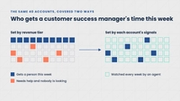
Make account work repeatable across your teams.
Define what agents do for post-sales teams and review every run from one workspace.


Turn recurring account tasks into assignments.
Set the instructions, account groups, timing, and permitted actions so agents carry out each task consistently for every account owner.
Renewal preparation
A report for the account owner before the renewal date, covering usage, support history, and open commitments.
Onboarding follow-up
A draft message for customers whose setup has stalled, using the relevant account context.
Account record updates
CRM notes and next steps from customer calls, written through an authorized connection.


Choose recipients and tailor tasks by segment, owner, or customer need. Edit the instructions and timing as the process changes.
Connect each task to the systems it needs.
Connect customer data and choose what agents can read, draft, send, or update in each tool.
Combine CRM, product, support, and billing records with conversation history to inform the task.
Connect agents to tools such as Salesforce, HubSpot, Amplitude, Mixpanel, and Slack through a catalog of 1,500+ connectors.
Deliver briefs and notifications, send permitted outreach, and write updates to the selected tools.
Authorize the connections and actions required for each task before it runs.


Review every run and resolve blocked tasks.
Trace completed work to its assignment and identify the human input needed when a task cannot continue.
- Run history
Review the accounts, status, start and finish times, and output for each run.
- Traceability
Follow a brief, report, or update back to the run and instructions behind it.
- Needs you
See blocked work, the account affected, and the step needed to continue, alongside customer alerts requiring attention.
- Assignment controls
Change instructions, accounts, recipients, or timing, or pause the task.

Review the first runs before expanding agent work.
Review task completion, team effort, and customer progress to decide what to change next.
Frequently asked questions.
What does RevOps need to provide during setup?
Explain the task and current process, identify the records and systems involved, and bring someone who can authorize access. After an agreement is in place, Trig helps connect the data, configure the assignment, and review the first runs with you.
Does Trig replace our CRM or other RevOps tools?
No. Trig works through the tools your team already uses. Agents read from your CRM, product, support, and billing systems and deliver their work to your selected tools. The Control Panel adds one place to direct and review agent work across teams.
Can we access account data through an API?
Yes. The API supports reading account lists, individual records, and attributes. You can create and revoke API keys.
Which part of revenue operations does Trig support?
Trig supports post-sales account work across onboarding, adoption, retention, and expansion. That includes the preparation, outreach, and record updates each requires.
Can Trig keep our CRM records up to date?
Yes. After customer calls, agents write notes, risks, next steps, and new contacts to the account record in Salesforce or HubSpot. They only do this within an assignment your team has reviewed and approved, through a connection you’ve authorized. Every update can be traced back to the run and assignment behind it.