
Keep all your customers moving forward.
Turn customer goals, usage, and conversations into timely account tasks, with a clear view of where your team needs to step in.




Hand off recurring customer tasks to agents.
Use assignments to delegate onboarding follow-ups, meeting preparation, and other recurring account tasks.
- Onboarding follow-up
Draft a message to help a customer complete a stalled setup step.
- Meeting preparation
Bring together customer goals, recent activity, and open commitments before a call.
- Post-call follow-through
Draft the follow-up and update CRM records with the discussion and next steps.
- Value summaries
Prepare a regular summary of the customer’s goals and results to support the next review.

Base the next action on what the customer needs.
The Context Engine connects customer objectives, behavior, and conversation history to inform each task.
Define the stages and milestones that show whether customers are reaching value.
Compare customer behavior against benchmarks to identify risks and opportunities, from stalled onboarding to room for growth.
Keep customer priorities, previous discussions, and open commitments available when agents prepare the next task.

“Our first campaign saw a 100% open rate from our customers and it drove initial product activation from 30% to 83%. Trig has changed the game for us—it’s doing amazing things for our product.”
See where customers and agents need your attention.
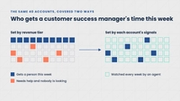
A prioritized view brings together customer alerts and tasks waiting on your input, with the context to decide what to do next.
Support customers beyond scheduled meetings.
Tailor recurring tasks by segment, account owner, or customer need to support both managed and scaled accounts.

Frequently asked questions.
Does Trig only monitor accounts?
No. Monitoring finds the changes in each account, and assignments put agents to work on them. Agents prepare briefs, draft follow-ups, and update records on a schedule or when a customer’s situation changes. They only work within an assignment your team has reviewed and approved.
What customer information does Trig use?
Trig uses connected CRM, product, support, and billing data, along with available transcripts, emails, and notes. You authorize the access needed for the tasks you choose.
How do we know the work is helping?
Review what agents completed, how much time your team spends reviewing and correcting it, and whether customers are reaching the milestones you selected. Use those findings to adjust or expand the assignment.
What’s a good first assignment for a customer success team?
Choose a recurring task such as onboarding follow-up or meeting preparation. Use the demo to explore how Trig could handle it. After an agreement is in place, our team helps with connections, configuration, and the first-run review.
Does Trig replace customer success managers?
No. Agents take on recurring tasks such as onboarding follow-ups, meeting preparation, and value summaries, and Trig shows your team which customers need a person. CSMs decide what agents work on and spend more of their time in customer conversations.