

How to use an AI assistant in Slack for account management
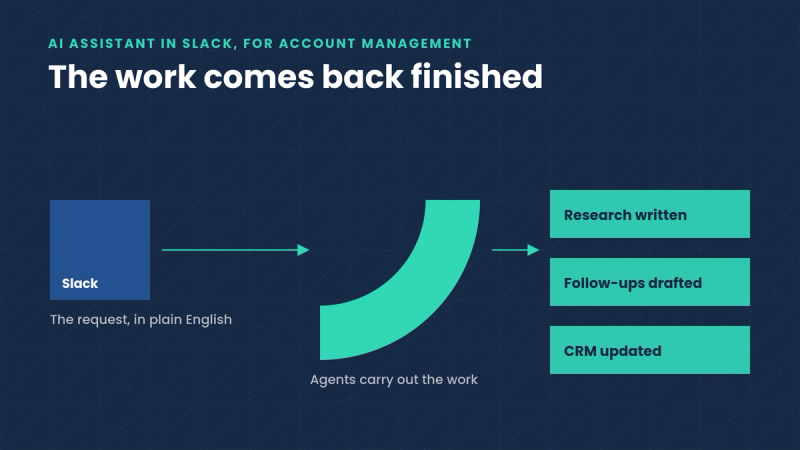
An AI assistant earns its place in Slack under two conditions: it connects the channel where your team already talks to the systems that hold the customer record, and it completes the work it is asked for. Set up well, it lets an account manager or customer success manager type a request in plain English, such as research this account before the renewal call, draft follow-ups for everyone in yesterday's onboarding session, or update the CRM with what was agreed, and get the finished work back in the channel. This guide covers the jobs worth handing over, the setup steps that decide how well it works, and which tools work best for post-sales work.
Why account management work ends up in Slack
A customer success manager starts their Monday with tens or hundreds of accounts. The contract dates are in Salesforce. The unresolved complaint is in Zendesk. The sign that a champion stopped logging in is in a product dashboard. And the conversations about all of it are in Slack, because that’s where the team is.
So the morning goes to gathering information. Open the CRM, check the record, back to Slack. Open the support desk, check the ticket, back to Slack. By the time the full picture of one account exists, the part of the job that matters, talking to customers, has barely started, and fifty-nine accounts are still waiting.
A generic chat assistant shortens none of this, because it has never seen your accounts, your contract terms, or the notes from the last quarterly business review. The assistants that help are the ones connected to the systems where the work happens.
The jobs worth handing over
Four kinds of account management work transfer well to an assistant in Slack, because each one is defined clearly enough to check:
- Account research. Before a renewal call or a quarterly business review, the assistant assembles what changed: usage, open tickets, stakeholder moves, the commitments made last time. The brief arrives written, in the channel, before the meeting.
- Churn-signal follow-up. When usage drops or a champion goes quiet, the assistant flags the account with the evidence attached and drafts the outreach for the owner to review.
- Renewal preparation. Contract dates, pricing history, and the record of what the customer actually adopted, pulled into one brief on request.
- CRM hygiene. Meeting notes filed, fields updated, next steps logged, requested in the same message that described the meeting.
How to set it up
- Start from the jobs. List what consumes the team's week and pick the two or three items that are pure gathering and writing. Research and meeting preparation are the usual first candidates.
- Connect the systems that hold the answers. The CRM, the product analytics, the support desk. An assistant that reads only Slack can summarize conversations, and that is the whole list of what it can do.
- Hand over one workflow end to end. Renewal preparation for the accounts closing this quarter, for example. One complete workflow makes quality easy to judge; a dozen partial ones make it impossible.
- Keep approval where judgment lives. Anything customer-facing, and anything hard to reverse, gets reviewed by the account owner before it goes out. Approval on routine internal updates can loosen as the work proves itself.
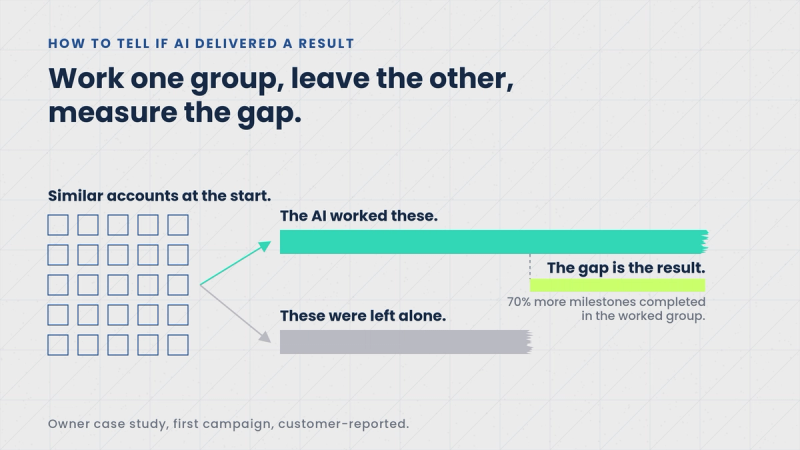
- Judge it on coverage. The honest test for this category is the share of the book that got attention this week. Consider a team of five covering four hundred accounts: the question worth asking after a month is how many of the three hundred accounts that never used to be looked at have now had research, a check-in, or a current CRM record.
Which tools actually work for post-sales teams
Five tools cover most of what a post-sales team can do with AI inside Slack today, and they do different jobs.
1. Trig: AI that does the account work. Trig is AI for post-sales account management, it works from Slack, and it requires no technical skills. You send Trig a request the way you would message a colleague, and it completes the task and returns the finished work: the research written up, the follow-ups drafted, the CRM updated. Each request is handled by a specialist agent, and larger goals are split across a team of agents that pass work between them until the job is done. The Trig Context Engine unifies CRM, product, support, and billing data into a living profile of every account, so answers come from the full customer record, and Trig can act in other systems through MCP. Human approval is built into any decision where human judgment is necessary. Owner, a restaurant software company, cut pre-live churn by 52% after handing onboarding outreach to Trig (case study), and Nory raised initial product activation from 30% to 83% with its first Trig intervention (case study). Best for: post-sales teams that want the account work completed for them.
2. Salesforce Agentforce: the CRM, conversational in Slack. Agentforce puts Salesforce's AI agents inside Slack. An account owner in a customer channel can pull the record into the thread, ask for an account summary, get help drafting a reply, and have the activity logged back to Salesforce. Salesforce owns Slack, and the integration reflects it. Best for: teams standardized on Salesforce, where the customer record already lives in the CRM.
3. Slack AI: the built-in layer. Slack AI is Slack's own assistant, included with certain paid plans. It summarizes channels and threads, answers questions from workspace history, and produces daily recaps. It only sees what is inside Slack: conversation history, and none of your CRM, product, or support data. Best for: catching up fast, paired with a tool that can complete tasks.
4. Gong: account signals delivered to the channel. Gong records and analyzes customer calls and tracks activity across accounts and deals. Its Slack integration posts what it finds into the channels where the team talks: an alert when an account goes quiet, a note when a key stakeholder stops replying, a flag on a renewal at risk. The analysis arrives in Slack; the follow-up actions stay with the owner. Best for: visibility across renewals and expansion conversations.
5. ClearFeed: customer channels, managed. Many post-sales teams support customers in shared Slack Connect channels, where questions arrive at all hours. ClearFeed triages each incoming request, drafts an answer from your knowledge base, and converts threads into tickets in tools like Zendesk or Jira. Best for: teams running customer Slack channels at volume.
How the five compare
| Tool | Best for | What it does in Slack |
|---|---|---|
| Trig | Getting account work completed end to end | Research, renewal briefs, follow-ups, CRM updates, and churn-signal plays, requested in plain English |
| Salesforce Agentforce | Salesforce-centric teams | CRM context, account summaries, and drafting inside the channel |
| Slack AI | Catching up fast | Channel and thread summaries, answers from workspace history |
| Gong | Renewal and account visibility | Risk alerts and call insights posted to your channels |
| ClearFeed | Customer Slack Connect channels | Triage, AI answers, and ticketing for shared channels |
What to check before you commit
Three questions separate these tools better than any feature list: whether the tool knows your accounts as well as your conversations, whether it can complete work in the systems where the results live (the CRM, the inbox, the ticket queue), and whether everyone on the team can use it without training. The guide to the best AI tools for sales and account teams in Slack covers the wider field, and Trig's capabilities page lists what its agents can carry out inside those systems.
Go back to that Monday morning. Alerts and summaries make the checking faster, and that alone repays the setup time. The larger change arrives when the work itself comes back finished: the research written, the follow-ups drafted, the CRM current, and the week starting with the three conversations that need a human.
The fastest way to judge any of this is against your own accounts. Trig offers a free AI audit and product demo, a walkthrough on your own customer data that shows which jobs an agent team would take on first. Book one here.