


How much should a person check when AI agents take action on customer accounts?
AI agents in customer success now do more than answer questions. They update renewal fields in the CRM, log activity, prepare renewal reports and draft follow-up emails to customers whose onboarding has stalled. The first instinct of most leaders, once agents start acting on real accounts, is to put a person in front of every action. Each CRM update and each email waits in a queue until a manager clicks approve.
That setup feels safe. It also gives back much less of the time the agents were meant to save, and the checking it produces is shallow. Consider an account manager whose agents work across 120 accounts. By Monday lunchtime there are forty items waiting: twenty-five field updates, ten drafted emails and five call summaries. Most of them are right. The manager knows most of them are right, so the clicks get faster, and by the thirtieth item nobody is reading.
Review the work in two places. Review it once, carefully, when the work is defined: what the agent will do, for which accounts, using which information and which actions. Review it again at the few actions that reach a customer in a way that is hard to take back, or that commit the company to money or terms. Everything else should run and be logged, and anything unusual should go to a named person as an exception. That is where human judgment has the most effect on the quality of the work, and where it costs the least of the capacity the agents were meant to create.
Why approving every agent action stops working
Researchers studying how people supervise AI agents (arXiv, June 2026) found that even when an automated monitor correctly flagged a bad agent action, the action still went through in 56% of sessions, because the person reviewing it approved it anyway.
The most likely explanation is volume, and anyone who has cleared an approval queue will recognize it. When almost every item in a queue is correct, approving becomes a habit, and the rare wrong item gets the same quick click as the rest. Adding more approval steps adds more items to the queue, and that makes each review shallower. A leader who routes every CRM update through a manager has made the manager responsible for every update, while giving them too many to check properly.
The opposite mistake is to remove review altogether. A February 2026 study of agent reliability (arXiv) found that the consistency of agents' outcomes ranged from only 30% to 75% across the models tested. Account work repeats every week across hundreds of accounts, so an agent that gets a task right most of the time will still get it wrong somewhere in the book. Some checking has to stay. The question is where to put it.
What the evidence says about exception-based review
Stanford's Digital Economy Lab studied 51 enterprise AI deployments for its Enterprise AI Playbook (April 2026). In setups where AI handled more than 80% of the work and people reviewed only the exceptions, the median productivity gain was 71%. In setups where a person approved every item, the median gain was 22%.
The authors add a caveat. Part of that difference comes from which work each team chose, because exception-based review tends to be used on high-volume work where mistakes can be corrected. That caveat is also the practical lesson. Exception-based review suits work that is frequent, checkable and cheap to fix, and a CRM field update or an internal renewal report fits that description. A discount offered to a customer is the opposite case, rare and hard to reverse once the customer has seen it, so it needs a person every time.
These studies cover AI work across many functions. No independent controlled study has yet tested agents running renewals, expansion or executive business reviews in B2B companies, and every published outcome figure for renewal agents comes from a vendor. Every public deployment of agents in post-sales work that the research behind this piece found is aimed at the long tail of smaller accounts, and each one keeps points where a person approves. No public example shows an agent running a strategic account's renewal or expansion on its own.
Where to put review points when AI agents update CRM records and send emails
The placement below is Trig's view, built from the evidence above, and every team will adjust the details.
- Review the plan before any work runs. This is the review that deserves the most care, because it covers every action that follows. Check what the agent will read, what it is allowed to do and what it will produce, for which accounts and on what schedule.
- Review messages that reach customers until the wording is settled. A drafted email can stay as a draft for the account owner to send, or go out automatically once the team has approved its wording. A sensible start is to keep drafts, and switch to approved wording once the drafts have been right for a few weeks.
- Keep price, discounts and contract terms with a person. A wrong number in an internal report costs a correction. A discount promised to a customer is very hard to withdraw, so these decisions stay with the account owner however good the agent's preparation is.
- Send exceptions to a named owner. When an agent cannot finish a task, or finds something the team asked to hear about, such as a champion leaving or usage falling before a renewal, the item should go to one person with the account and the context attached.
- Log everything else. Routine updates and reports should run without a click, with a record of what was done, for which account and why, so anyone can check any piece of work after the fact.
Who owns the exceptions
Exceptions only work if someone is responsible for them. HBR (February 2026) describes a new role it calls the agent manager: the person who defines the tasks agents carry out, reviews their output, handles exceptions and adjusts the work over time. The authors expect it to become a standard job title within 12 to 18 months. One of the article's co-authors is an executive at a large CRM vendor, which is worth knowing when reading the prediction.
McKinsey, describing what it calls the agentic organization (2025), sketches teams of two to five people supervising 50 to 100 specialized agents that run an end-to-end process such as customer onboarding. That is a consultancy's model, and the research behind this piece found no measurement of it in customer success. It does describe the job that review becomes once it moves from approving items to owning exceptions: the people on the team decide what the agents work on, deal with what the agents cannot finish, and change the instructions when the same exception keeps coming back.
In a customer success team the role maps onto people who are already there. The account owner is the natural person to handle exceptions on their own accounts, and a team lead or operations manager is the natural owner of how the work is defined across the team.
How Trig handles review and exceptions
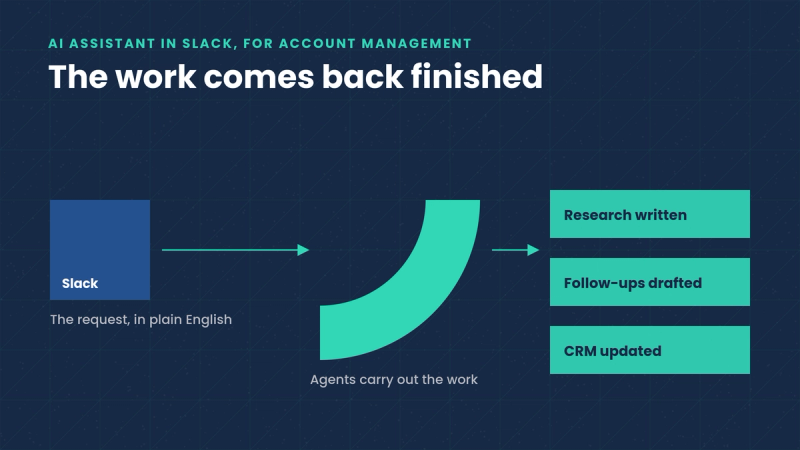
Trig is built on the assumption that agents do the account work and the team directs and reviews it. Work in Trig runs as assignments. An assignment sets out the task, the accounts it covers, when it runs and the actions agents may take, such as updating CRM records, logging activity or drafting and sending email through the company's email provider. Before an assignment runs, the team reviews Trig's plan: the information agents will use, the actions they will take and the work they will produce. Agents can only do what that assignment allows.
For each assignment, the team decides whether messages are left as drafts for the team to send or sent once the wording has been approved. Each time an assignment executes is a run, and every run is recorded, so any brief, report or CRM update can be traced back to the run and assignment that produced it.
Exceptions go to Needs you, a single list in Trig's Control Panel, which is the part of Trig where a team directs and checks agent work. Needs you holds two kinds of item. Customer alerts are accounts that meet a condition the team asked Trig to flag, shown with the context and a possible next step. Blocked work is a task that needs a person, shown with the affected account and the step needed to unblock it, such as mapping a new CRM field. When work is blocked, agents hold it until a person completes the step, and then they resume. Any assignment can be edited or paused at any time.
What this looks like in practice
Consider a team of five account managers covering 500 accounts. The team lead writes one assignment for renewal preparation. Every Monday it updates the renewal fields in the CRM for accounts renewing in the next 120 days, and two weeks before each renewal it prepares a report with contract details, usage, support history and recent call summaries for the account owner. Where no senior contact at the customer has replied recently, it drafts a check-in email for the owner.
The team lead reviews the plan once, closely, before the assignment is switched on, and checks the first two runs line by line. After that, the CRM updates and the renewal reports go through without approval, and every one is in the run history if someone wants to check it. The check-in emails stay as drafts for the account owners to edit and send, because they go to customers. Pricing for each renewal is decided by the account manager in the renewal conversation, as it was before.
In a typical week the team might see six items in Needs you. Four are alerts the team asked for, such as a champion who has left the company. Two are blocked tasks, because a new field was added to the CRM and needs mapping. That is six decisions for people to make. If every CRM update and report waited for a click instead, the same work would produce roughly 180 approvals a week, because about 167 accounts renew in any 120-day window and about ten reports fall due each week. The figures here are an example, and every team's numbers will differ.
What this means for the customer success team
For a customer success leader, the change is in where the team's attention goes. Approving every action spreads attention thinly across hundreds of correct items. Reviewing the plan carefully, holding the decisions about customers and money, and owning a short list of exceptions puts that attention where a person's judgment decides what happens to the account: the plan, the messages customers read, the price and the short list of things the agents could not finish.